
Your services catalog powers the rest of Listo: quotes pull line items from it, jobs know how long to block off, and teams are matched to jobs by the services they offer.
Add your services
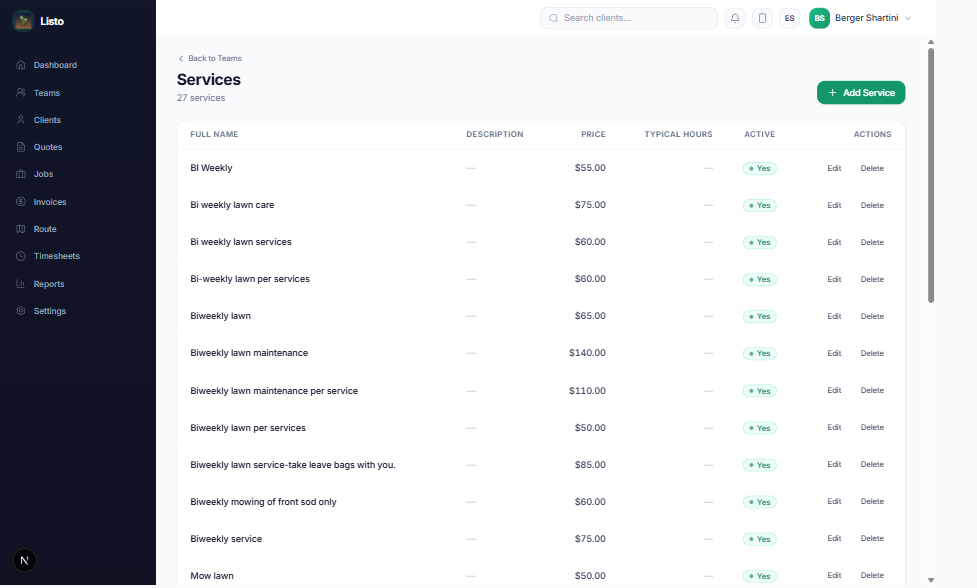
- 1Go to Teams and click Manage Services.
- 2Click Add Service.
- 3Enter the Service Name, an optional Description, the Price, and the Default duration in hours.
- 4Leave the Active toggle on and save. Repeat for everything you offer — mowing, deep cleans, drain repair, panel upgrades, you name it.
- Edit or delete services anytime — existing jobs keep their details.
- Default durations feed scheduling and route planning, so realistic estimates make better routes.
- Client-specific pricing is set on the client profile under Service Rates, overriding catalog defaults.
Tip: When you create teams, you check off which services each team performs — that's how auto-assignment knows the right crew for every job.